
Wye
Every link, in the browser you want.
A browser picker for Linux, written in Rust. Wye registers as your default browser and sends every link to the browser, profile, private window or desktop app your rules pick, and it asks with a small picker only when no rule does. It finds your browser profiles by itself and strips tracking from links on the way through. On KDE Plasma and on GNOME it looks like part of the desktop. It is free and MIT-licensed.
Each release has a .deb, an .rpm and an AppImage for x86-64 and ARM64. With Nix, try it without installing: nix run github:psoldunov/wye -- browsers. The install guide covers the home-manager and NixOS modules. Wye is Linux only. On a Mac, use Velja, the browser picker that inspired it.
- Platform
- KDE Plasma 6 · GNOME 48+ · Linux
- Opens in
- Browsers · profiles · apps
- Ships as
- .deb · .rpm · AppImage · Nix
- License
- MIT
What it is
I built Wye because I wanted Velja on Linux. Velja is Sindre Sorhus's browser picker for the Mac, and Wye borrows a lot from it. If you are on a Mac, use Velja.
Linux gives you one default browser. Every link you open outside a browser goes to it, whether it came from a chat app, a mail client, a terminal or a document. That is fine until you keep work and personal browsing apart, or a separate profile for each client.
Wye takes that slot. It registers with the desktop as the default web browser, so every link reaches it first, and it passes each one on to a browser, a browser profile, a private window or a desktop app. It never shows a page itself. Your rules decide where most links go. When none of them does, Wye can ask: a small picker opens at the pointer with a tile for each browser and profile you chose to show, and under the tiles, the app the link came from and its address.
Tiles have hotkeys, so a link usually costs one keypress. Hold Shift as you choose and it opens in a private window, Ctrl puts it in the background, and Alt opens a new window. Right-click a tile for the same options in a menu.
Wye finds the profiles of Chromium-based and Firefox-based browsers by itself, Firefox's newer profile groups included, and any profile can be a target, just like a browser. The tray menu opens whatever link is on the clipboard and, while history is on, lists the last ten links you opened.
It runs on x86-64 and ARM64. KDE Plasma 6 came first. GNOME Shell 48 and later has its own front end, and the core and the command line work on any Linux desktop.
Why not Junction
Junction is the usual answer when someone on Linux asks for a browser picker. It is an application chooser for anything you open, files as well as links, and it treats a link the way it treats a file: it pops up and asks which app should take it, every time. Both register as the default browser and both can show a chooser, and that is about where the overlap ends.
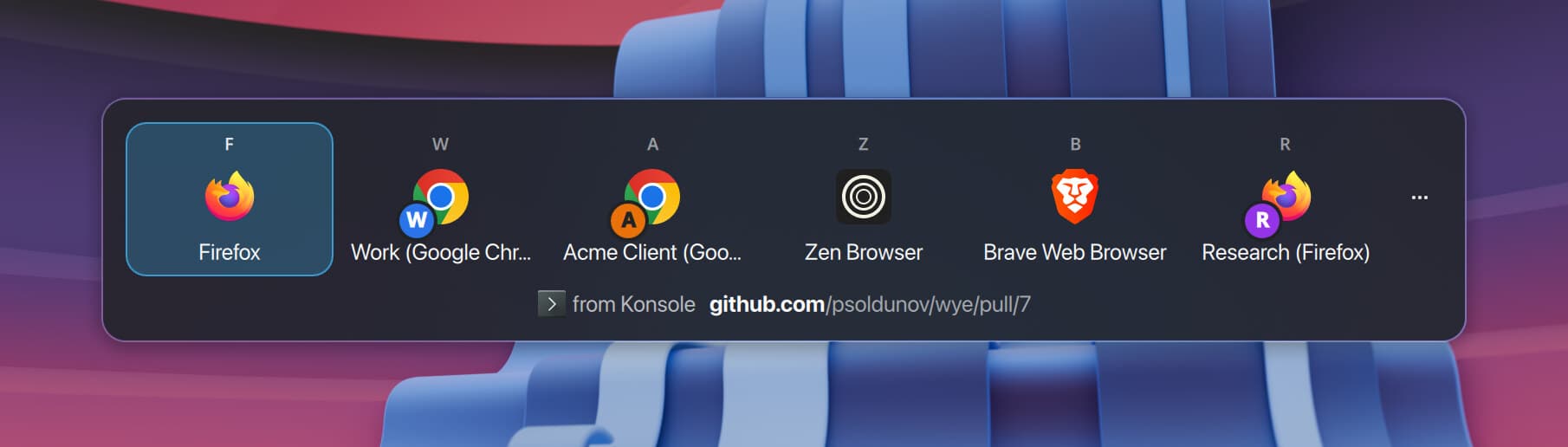
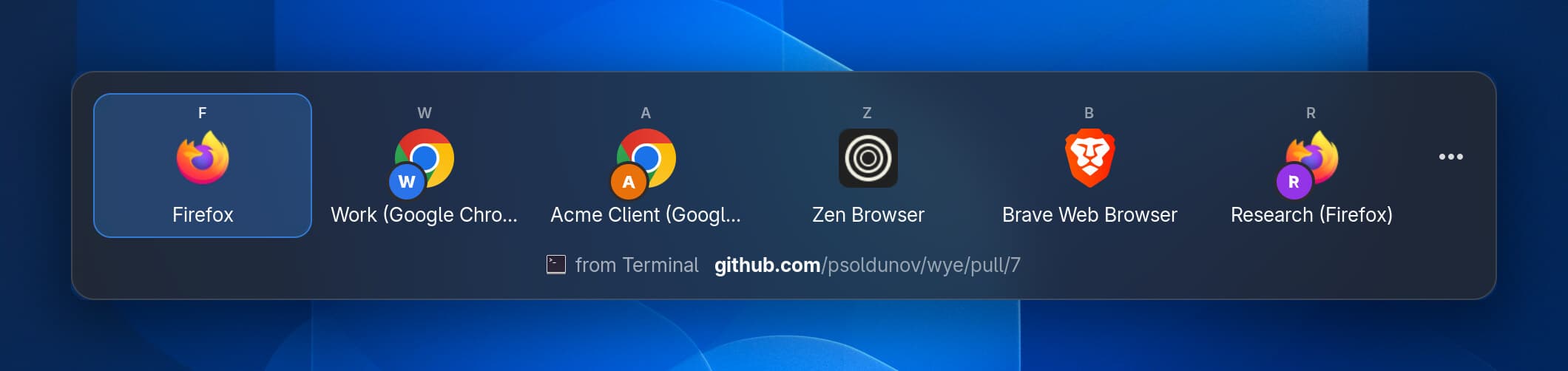
The chooser is the part you look at most, so Wye draws it with each desktop's own toolkit. On KDE Plasma the picker is Qt and Kirigami, in Breeze and your colour scheme: a borderless, translucent panel on KWin's overlay layer, with blur behind it and no title bar. It shows up at once, at the pointer and over the app you clicked in, and it already has the keyboard. On GNOME, Wye's Shell extension draws the picker and the tray menu inside GNOME Shell itself, so they look like the Shell's own popups, blur and all. Light and dark follow the desktop on both.
Every tile has the browser's icon, its name and its hotkey. You choose the key for each browser, so Brave stays on B however the tiles are ordered. A profile shows its browser's icon with a badge in the profile's colour, which makes your Work and Personal Chrome two different tiles at a glance. Under the tiles sit the app the link came from and the address, with the host in bold, so you know where a link is going before you send it anywhere. The KDE picker is the screenshot just above this chapter, and the GNOME one is further down.
Junction is one GTK 4 and libadwaita window on every desktop. On GNOME that fits. On Plasma it is an Adwaita window among Breeze ones, and it looks like it wandered in from GNOME. It is also an ordinary window, so the window manager decides where it opens: its README has GNOME users turn on Mutter's center-new-windows to keep it in the middle of the screen. Its tiles are icons only until you switch on app names, so three Firefox profiles are three identical Firefox logos, and its troubleshooting section suggests editing the desktop files to give them different icons. Put the two side by side and it is not close.
Junction has no rules, either. It cannot learn that Jira links go to the work profile and YouTube goes to Brave, so you answer the same question on every click. Wye asks only when nothing else has decided. Its rules match the link, the app you clicked it in and the keys you held, and when one matches, the link opens where the rule says. A rule can also rewrite the link with a short script first. When the picker does ask, Create Rule in its menu (Ctrl+R) opens the rule editor already filled in with that link's domain and the app it came from, so one answer can become the default.
Then there are profiles. Junction offers the apps your desktop knows about, so to choose a Firefox profile, its README has you write a desktop file for each profile by hand and then refresh the desktop database. Wye finds the profiles of Chrome, Chromium, Brave, Vivaldi, Edge, Firefox, Zen, LibreWolf and Floorp itself, Firefox's newer profile groups included, and a profile you add later appears after a rescan. Every profile it finds can be a target: in a rule, as your primary or alternative browser, or as a tile in the picker.
Junction opens a link as it gets it. It shows you the address and lets you edit it, but unwrapping an Outlook Safe Link or deleting the utm_ parameters is your job. Wye does both before any rule runs, and expands short links on the domains you allow. Its global transform script can rewrite links as well, say www.reddit.com to old.reddit.com.
Junction does cover ground Wye does not. It can be the default for files, folders, mailto: and other schemes, and it asks which app should open each one. Wye takes http and https links, and local HTML files if you switch that on. Junction is on Flathub and runs on Linux phones. Wye is a desktop app, and it ships as a .deb, an .rpm, an AppImage and a Nix flake.
If you do want to be asked every time, make the picker your primary browser. Wye then works like Junction for every link your rules leave alone, and the rest open without asking.
Where a link goes
Every link goes through the same steps in the same order. First Wye unwraps redirect wrappers, like the ones Outlook's Safe Links, Google search results and Slack put around a link, and expands short links. It follows short links only for domains you have switched on, and one time limit covers the whole chain. If the limit runs out, the link carries on as far as it got. Then Wye strips tracking parameters, forces HTTPS if you asked for that, and hands the result to your global transform script if you wrote one.
Holding the alternative-browser key while you click skips the rules and sends the link straight to your alternative browser. It is the escape hatch, so it beats every rule.
Otherwise the rules run, top to bottom, and the first match wins. A rule can match on the link, on the app it was clicked in, on the modifier keys you held, or on any mix of those. It can open its target in the background or in a new window, and it can run a script of its own on the link before it opens. The Apps page adds built-in rules for services like Discord, Slack, Zoom and Spotify, which send their links to the desktop app or to a browser you pick, and each of your rules runs either before or after them. A link nothing claims goes to the primary browser. The primary browser can be the picker.
Transform scripts are plain JavaScript. The script gets the link as a URL that behaves the way it does in a browser and returns the link to open. Each run gets a fresh QuickJS runtime with 16 MB of memory and 50 ms to finish, and it has no network, file access or timers. An edit to a script applies to the next link.
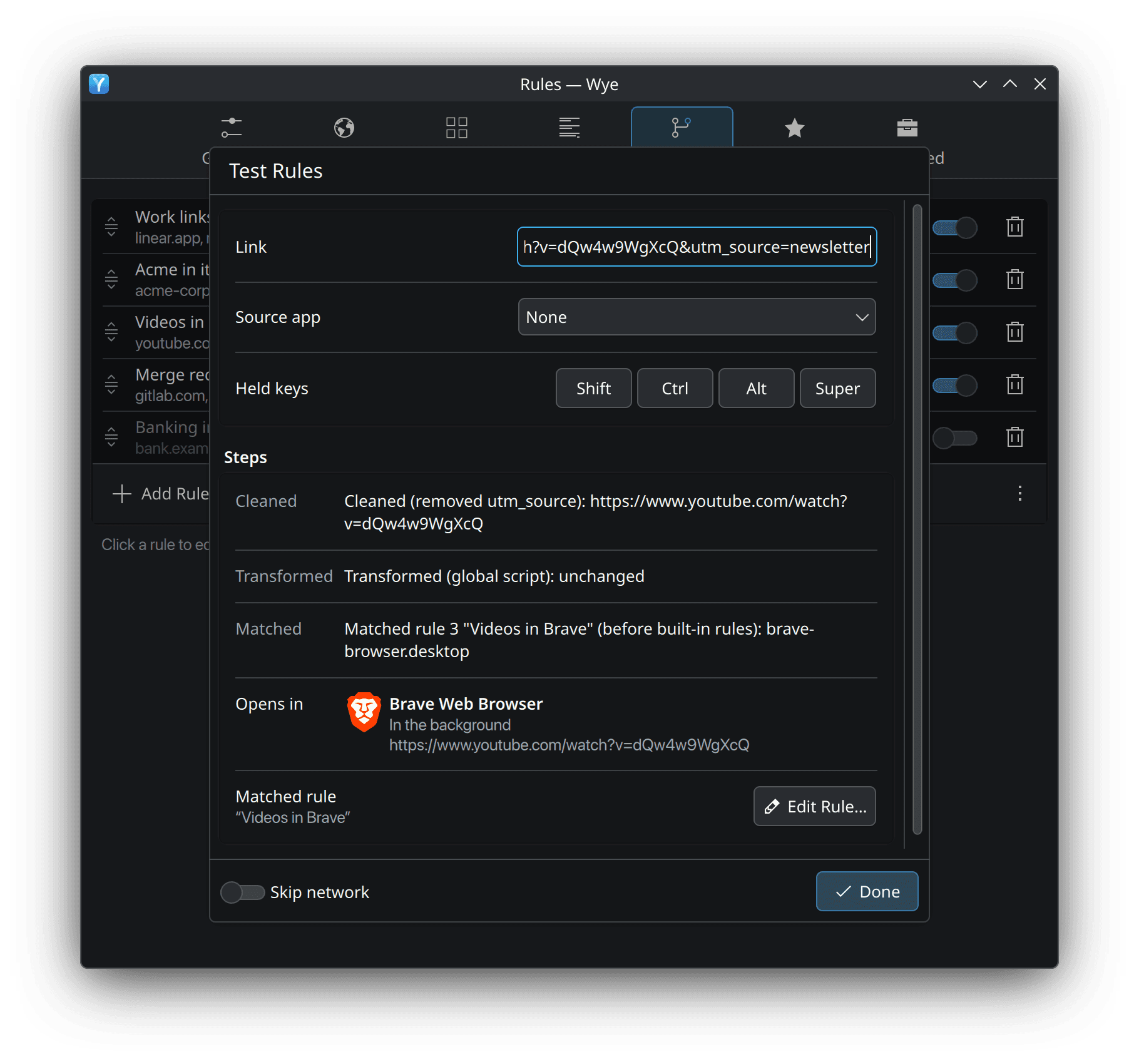
When a link lands somewhere I did not expect, wye test <url> prints every step and the rule that matched, and Test Rules in Settings shows the same trace. Neither one opens the link.
At home on Plasma and GNOME
I wanted Wye to look like it came with the desktop, the way Token Station does. So the routing lives in one Rust service per session, and each desktop draws the interface with its own toolkit. The two halves talk over D-Bus.
On KDE Plasma, a Qt and Kirigami host draws the picker, the tray menu popup and every window. On GNOME, a Shell extension draws the picker and the tray menu inside the Shell itself, and Settings and the other windows are GTK 4 and libadwaita. Choose the GNOME front end on Sway, Hyprland or niri and the GTK host draws the picker too, as a layer-shell overlay where the compositor has one. The tray icon belongs to the service. It is a standard StatusNotifierItem, so it shows up in any tray that speaks the protocol.
Wayland was the awkward part. A normal Wayland client cannot read the keys you are holding, where the pointer is or which window has focus, and Wye wants all three: rules can depend on held keys, the picker opens at the pointer, and when a link arrives through the desktop portal, which hides the app that sent it, the focused window is the only clue left. So the service looks for a way to read each of them when it starts. On Plasma it loads a short KWin script that reads the pointer and the active window and reports them back over D-Bus. For the keys it maps a fully transparent 1×1 layer-shell surface that takes the keyboard just long enough to read the modifiers, then closes it. Each takes a few milliseconds. GNOME has no layer shell, so there the Shell extension answers instead. Every probe gives up after 150 ms, and then the picker opens in the middle of the screen.
What it took
Wye is a Rust workspace of nine crates. The routing core does no IO at all. You give it a link, where the link came from, the keys held and the configuration, and it returns a decision, so it can be tested without a desktop. In the service, each piece of the session (held keys, the pointer, the clipboard, launching a browser and the rest) sits behind a trait with a no-op version and a fake. The end-to-end tests start the real service on a private D-Bus daemon, with a fake browser and a fake picker.
Wye also has a written specification for every surface and every step a link goes through. Each requirement in it has an ID such as PICK-04, and the code comments, tests and commit messages that implement it cite that ID.
Each release has six packages: a .deb, an .rpm and an AppImage, each for x86-64 and ARM64. CI installs every one of them in a clean container and launches both interfaces before anything is published. The AppImage bundles every library it uses, glibc included. On Nix, Wye is a flake with two channels. release builds the latest tagged release with that release's own flake, and git builds master. The home-manager and NixOS modules install it, make it the default browser and start it with the session.
The screenshots on this page come from the repository. Scripts render them in headless KWin and GNOME Shell sessions with demo data, so the profiles, rules and links in them are made up.
I built Wye in Ensemblr. The repository keeps its .ensemblr/settings.toml, which puts the tests, the lint gates, rust-doctor, the Nix build and the full CI check on buttons.