
Token Station
See the limit before you hit it.
A usage monitor for Claude Code and OpenAI Codex. It shows your session and weekly limits, when each one resets, and what your tokens would cost at API prices, in the macOS menu bar or the Linux panel. It is free and MIT-licensed.
or brew install --cask psoldunov/tap/token-station on a Mac. On Linux, the AppImage sets itself up for your desktop, and the install guide covers the Nix flake.
- Platform
- macOS 14+ · KDE Plasma · GNOME
- Tracks
- Claude Code · Codex
- Credentials
- Read only
- License
- MIT
What it is
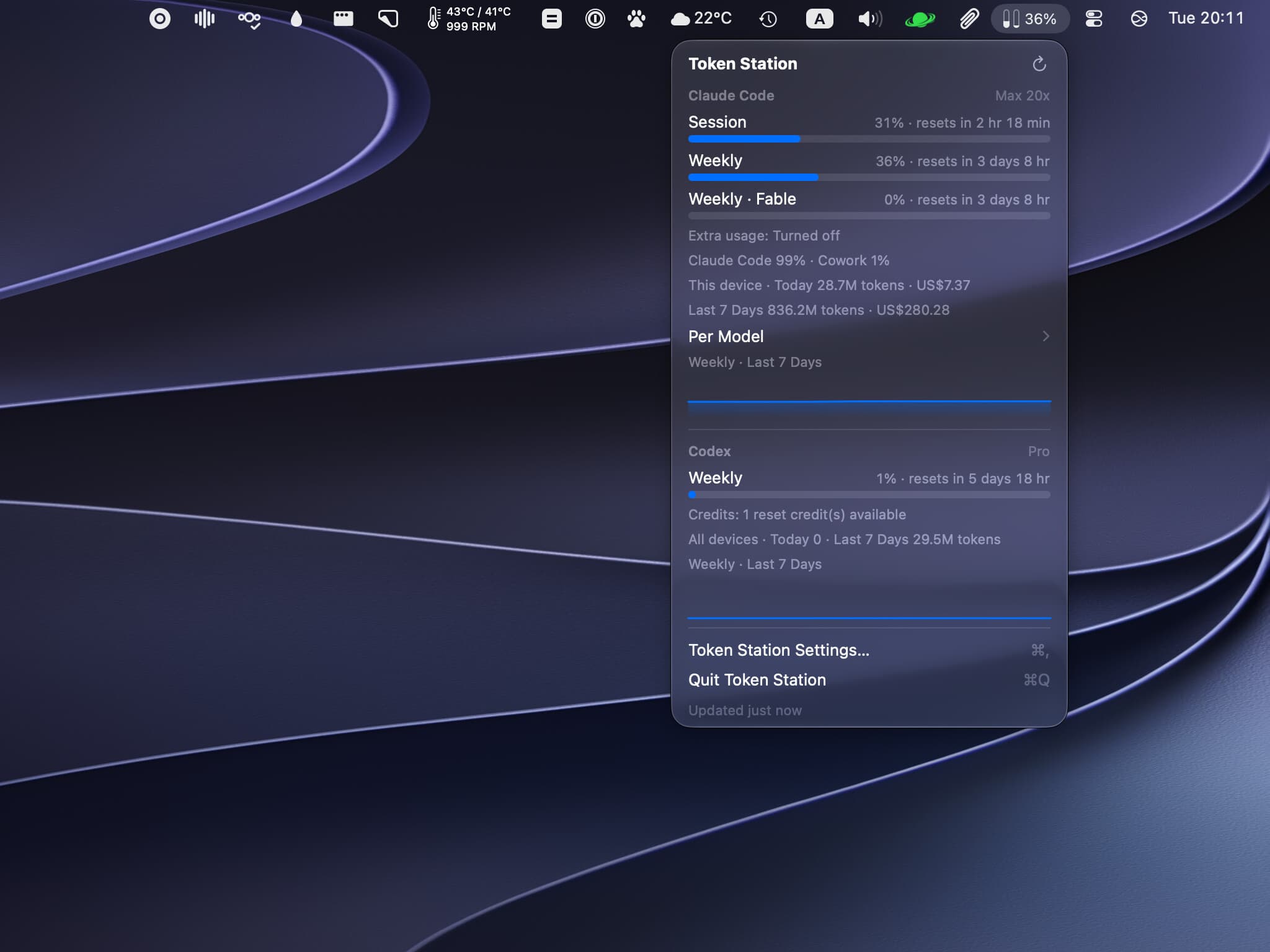
I wanted to see a limit coming before it stopped an agent halfway through a task. Token Station keeps your Claude Code and OpenAI Codex plan usage where you can see it. On a Mac it sits in the menu bar, and on Linux in the panel, as a small meter with two bars: one for Claude Code and one for Codex. Each bar fills to whichever limit is closest to running out, and changes color when that limit crosses the warning or critical threshold you set.
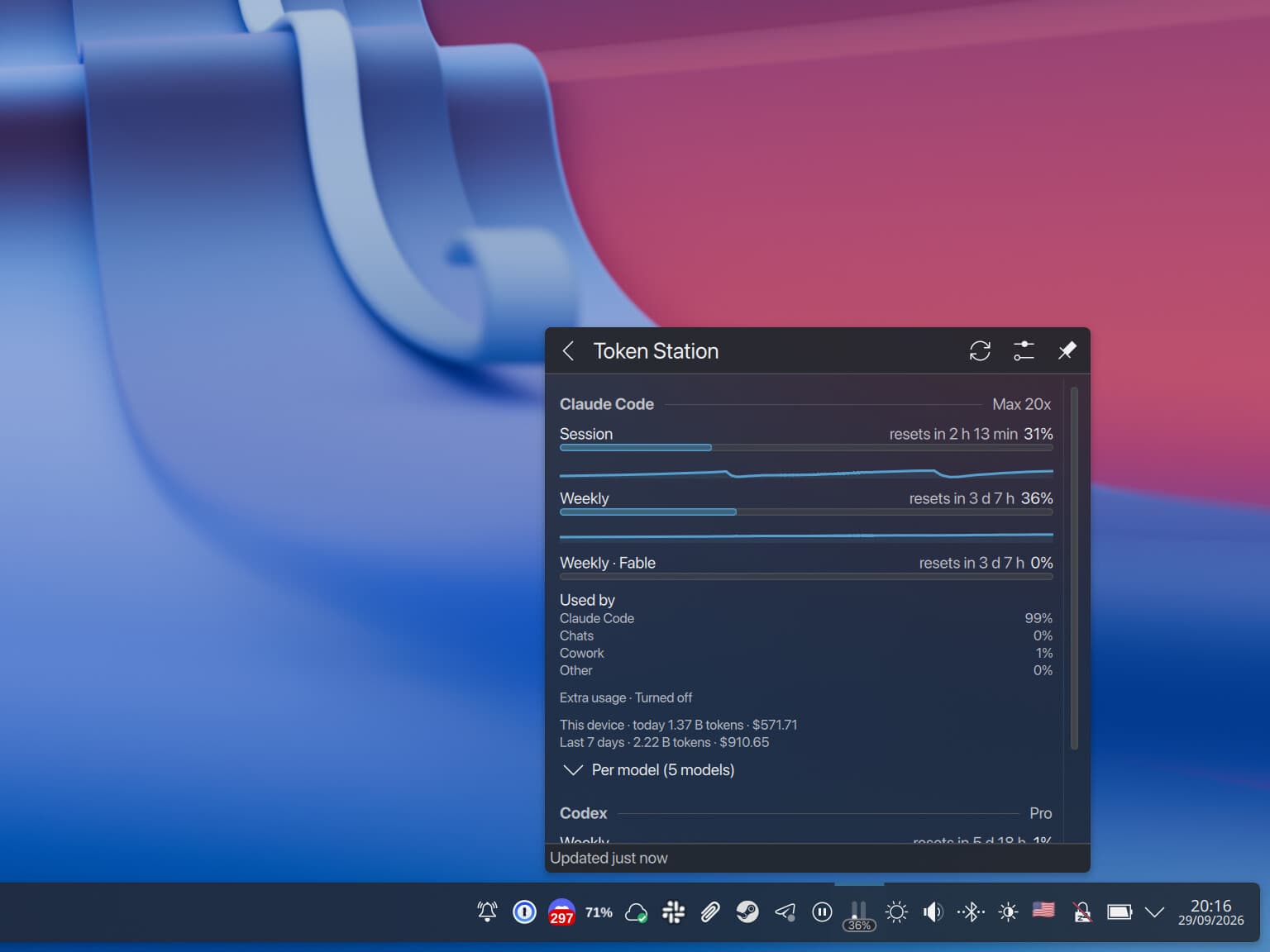
Click it for the rest. You get the session and weekly limits and the time left until each one resets, plus any weekly limit a single model has of its own. Below them are the tokens this machine used today and over the last seven days, with what they would have cost at API prices. A Per Model row splits those tokens by model, and a small chart plots the limit the meter is showing over the last day or week. When a limit crosses a threshold you get one desktop notification about it, and no more until that window resets.
It runs on macOS 14 or later, KDE Plasma 6.4 or later and GNOME Shell 46 to 50. Other Linux desktops get a plain tray icon, as long as they can host one. Plan limits need Claude Code signed in with a Pro or Max subscription and the Codex CLI signed in with ChatGPT. With only an API key you still get token counts and cost.
Where the numbers come from
Claude Code's plan limits come from the endpoint behind its own /usage command, called with the sign-in the CLI already has. On a Mac, Claude Code keeps that sign-in in the login Keychain, and Token Station reads it through /usr/bin/security, the same tool Claude Code writes it with. That tool is already on the item's access list, so reading it never raises a Keychain prompt.
The endpoint is not a documented API, and it rate-limits hard. Polled every five minutes, it answered 429 often enough to notice, so Token Station now asks every ten. Each 429 in a row doubles the wait, up to an hour. The last good reading, the time of the last call and any backoff all survive a restart, so a restarted daemon shows the last numbers straight away and does not hit the endpoint again early. There is an official route as well. During Pro and Max sessions, Claude Code hands its statusline command a rate_limits block, and token-station statusline forwards that to the daemon while passing the input through to the statusline you already had. For each window, whichever reading is newer wins.
Codex is simpler. When the daemon needs fresh numbers it starts codex app-server, lets the logged-in CLI deal with authentication, and stops it again after a minute of idleness. The server holds about 150 MB of memory while it runs, which is why it does not stay up, and the price is a wait of about six seconds for its first answer after each start. Setting process_mode = "persistent" keeps it running, if you would rather pay in memory.
Token counts come from logs both CLIs already write: Claude Code's transcripts in ~/.claude/projects and Codex's rollout files. Cost comes from LiteLLM's price table, refreshed daily, with a bundled copy as the fallback. A model with no price is still counted, just not priced. Codex also reports tokens for the whole account across every device. That measures something different from what one machine's logs add up to, so the two are shown separately.
None of this ever writes a credential. Both CLIs rotate their refresh tokens, and a second program refreshing one would race the CLI and could sign you out. When the Claude token expires, Token Station runs claude auth status and lets the CLI refresh itself.
One daemon, a front end per desktop
Only the daemon touches credentials, the network or log files. It is a small Rust program that publishes one JSON snapshot, over the session D-Bus on Linux and over a Unix socket on a Mac, and each front end just draws it. The logic lives in one place, and the GNOME extension never blocks the compositor.
On Linux I skipped the usual windowed tray app. Vanilla GNOME has no tray, and on Wayland an ordinary window cannot anchor itself next to a tray icon. So Plasma gets a system tray applet written in plain QML, and GNOME gets a Shell extension in the top bar with its preferences in libadwaita. Both open popups that sit where the desktop puts its own, and both follow the theme, the accent color and dark mode without any extra work. The applet has no compiled plugin tied to one Qt version, which is what lets the same package run from Nix and from the AppImage. Any other desktop that can host a StatusNotifierItem gets token-station tray, a plain icon with a menu.
A Mac has no session bus, so there the daemon speaks JSON-RPC over the socket instead. The app is SwiftUI, a MenuBarExtra in window style, which gives the panel the same material, shape and placement as the system's own menu bar extras, and Settings is a grouped form like System Settings. The daemon ships inside the app bundle. The app starts it, restarts it if it crashes, and holds a pipe to it so the helper cannot outlive the app. It also asks for a refresh when the Mac wakes up, which on Linux the daemon hears from logind.
What it took
The daemon is a Rust workspace of four crates. One holds the domain model, the config and the alert logic and does no IO beyond parsing, one talks to Claude Code, one to Codex, and the binary brings the scheduler, the D-Bus and socket services, the history store and the CLI together. HTTP goes through rustls, D-Bus through zbus, which is pure Rust, and SQLite is bundled. So the Linux build is a static musl binary that needs no glibc, libdbus, OpenSSL or FUSE 2 from the machine it runs on.
That binary ships as an AppImage for x86-64 and for ARM. Run it and it works out which desktop you are on, installs the matching front end and registers the daemon as a systemd user service. Everything it creates goes into a manifest, and uninstall removes exactly that and nothing else. On Plasma the applet shows up in the tray without logging out, because setup tells the running plasmashell about it. GNOME on Wayland still wants a fresh login. The Nix flake has the same pieces as packages, with Home Manager and NixOS modules, and a VM test that boots GNOME, loads the extension and takes a screenshot of it.
The Mac app has no Xcode project, just a Swift package and a build script. It still needs Xcode installed, because from the macOS 27 SDK on, the plugin that expands SwiftUI's macros ships only with Xcode and not with the Command Line Tools. Releases are universal, signed with a Developer ID and notarized, and come as a DMG, a zip and a Homebrew cask.
I built Token Station in Ensemblr. The repository keeps its .ensemblr/settings.toml, which puts preview, test, lint and build on the same buttons on a Mac and on a Linux box. Preview opens the native front end against a daemon serving fixture data, so working on the UI never reads a real sign-in.