
Skrepka
Copy on a Mac, paste on Linux.
A clipboard-history manager for macOS and Linux. Machines you pair share one history over the local network. There is no account to make and no server or relay in between. It is free and MIT-licensed.
or brew install --cask psoldunov/tap/skrepka on a Mac. On Linux, the install guide has a route for each distribution.
- Platform
- macOS 26+ · Linux (x86-64)
- License
- MIT
- Sync
- Local network, no relay
- Telemetry
- None
What it is
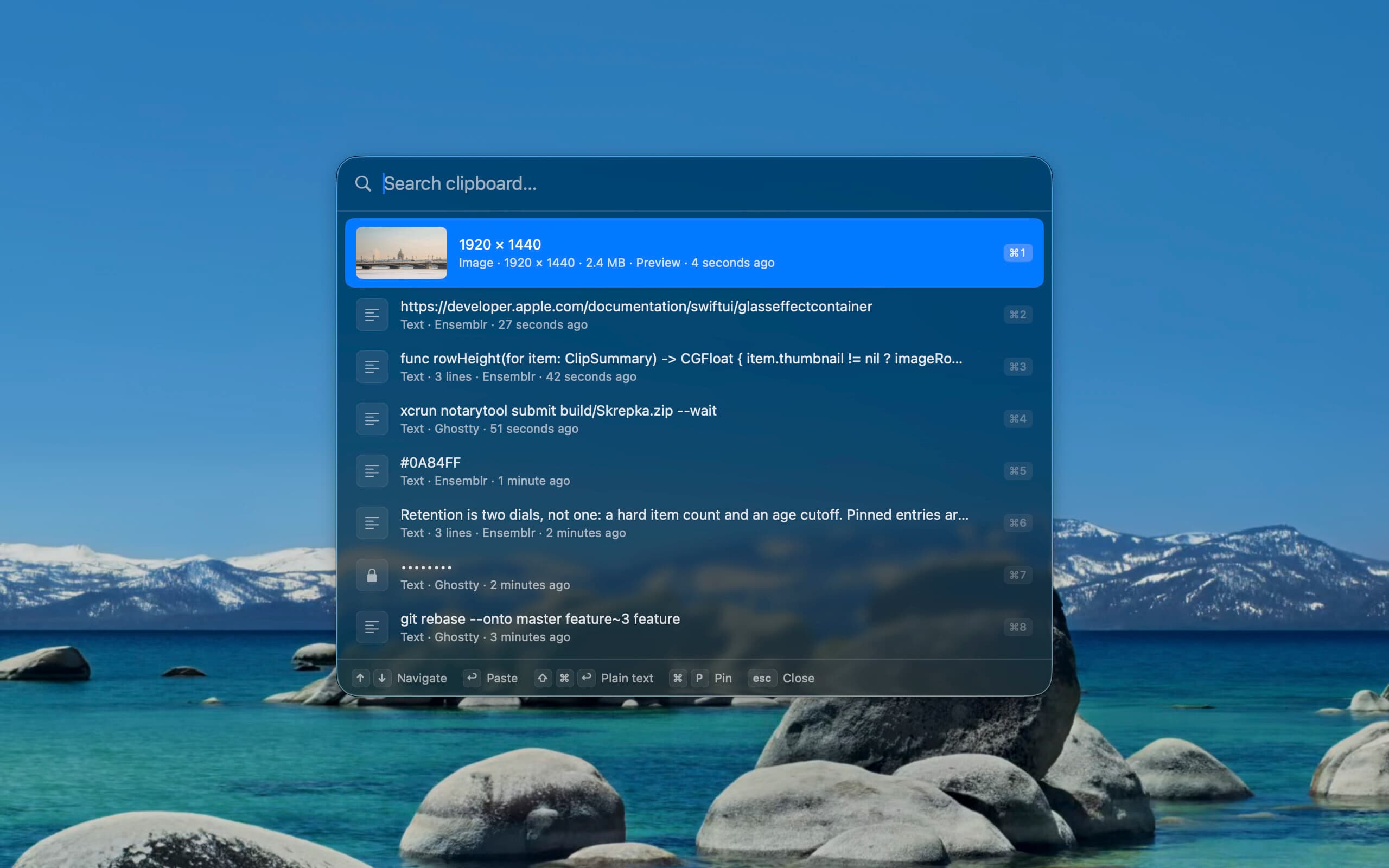
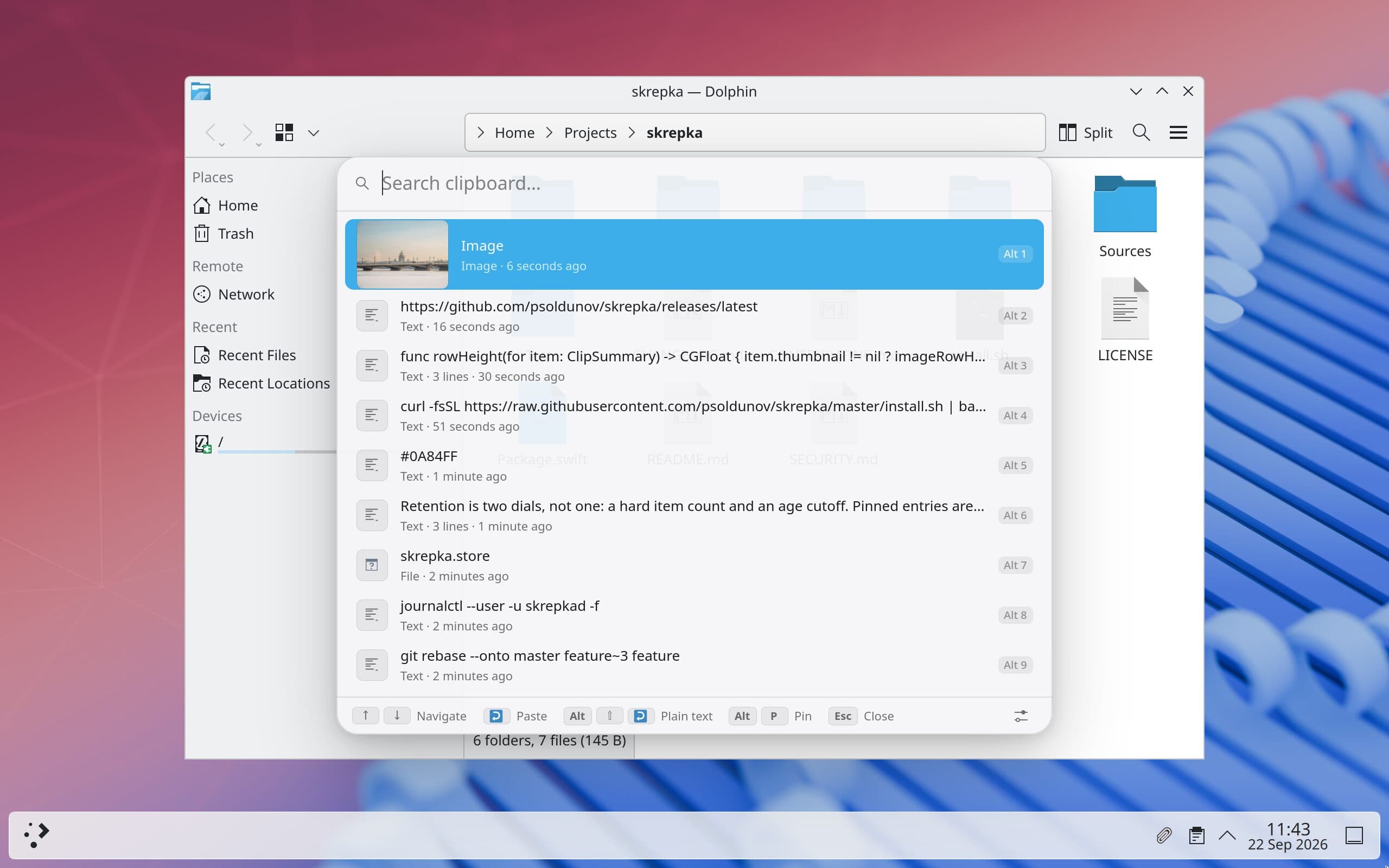
Skrepka keeps what you copy and hands it back on one shortcut. Press ⌘⇧V on a Mac, or Meta+Shift+V on Linux, and a picker opens over the app you are in without taking focus from it. Type to filter, move with the arrow keys, press Return, and the entry lands where you were typing. Each of the first nine rows has a key of its own. Pinned entries never age out, and a plain-text paste leaves the formatting behind.
It keeps text, rich text, links, files and images, and shows image previews inline. A copy of several files stays one row and pastes back as all of them. You decide how many items it keeps and for how long. Anything a password manager marks as not for history is never recorded. On a Mac, what it marks concealed is kept but masked wherever it appears.
On a Mac it lives in the menu bar with no Dock icon. The picker is drawn in Liquid Glass, which is why
it needs macOS 26. On Linux it is three programs: skrepkad, a daemon that keeps the history and runs
as a systemd user service; skrepka-gui, which is the tray icon, the picker and Settings in one GTK 4
process; and the skrepka command, which lists, pins, deletes and copies from a terminal. There is no
account to make, and there is no telemetry or update check.
Why another clipboard manager
Apple already moves the clipboard between Apple devices. Universal Clipboard carries one item, though, which the next copy overwrites, and it stops at the edge of Apple hardware. What I wanted was one searchable history, live on a Mac and a Linux box at the same time.
None of the usual answers does that. Maccy is a fast, native clipboard manager for macOS and only macOS, and it does not sync history between devices. CopyQ runs on Linux, Windows and macOS and does far more than Skrepka, with tabs, commands and a full scripting API. Its sync plugin mirrors a tab into a folder on disk, though, so sharing between two computers means bringing your own file-sync service and trusting it with everything you copy. KDE Connect pairs devices properly, and its clipboard plugin hands the current clipboard from one to the other. That is the clipboard rather than the history. There is nothing to search or pin, and images do not travel.
Skrepka covers the narrow case where those three stop. If you only use one computer, one of them is probably the better choice. They have been around longer and they do more.
Sync without a server
Pairing is manual on purpose. Switch on "Allow new devices to pair" on one machine and press Pair… for
it on the other: a Mac with a Mac, a Mac with a Linux box, or two Linux boxes. Both screens then show
the same sixteen hex digits, something like A3F2-91BC-D4E7-0182, and neither side trusts the other
until a person confirms that they match. That comparison is the defence against a man in the middle.
TLS proves that the two ends share a tunnel, and it says nothing about who is on the far end.
From then on, paired devices exchange history every half minute over TLS 1.3, each pinned to the self-signed certificate it approved. Each device also has a live-clipboard switch that pushes a copy across the moment you make it. The switch starts on between a Mac and a Linux box and off between two Macs, because Universal Clipboard already covers that case and two systems writing to one pasteboard race each other. A copied file arrives as the file, rather than as a path that exists only on the other machine, up to a size limit each device sets for itself. Concealed entries are filtered out of both the index a peer browses and the payloads it can fetch, so a peer never even learns their hash.
The merge model is deliberately small. A clipping never changes after capture apart from its pin and its timestamp, so the history is a grow-only set plus two last-writer-wins registers rather than a general CRDT. Identity is the hash of the content, which means two machines that copy the same string end up with one row. Deleting an entry writes a tombstone. An entry that ages out writes nothing, because a Mac keeping 500 items must not wipe a Linux box keeping 5,000, and treating retention as deletion is how a sync feature quietly destroys history.
There is no relay. The Mac finds its peers over Bonjour and Linux over Avahi, so two machines that cannot see each other on the local network cannot pair at all. That is the price of having nothing in the middle, and I am happy to pay it.
Linux, one desktop at a time
A Mac has one clipboard API, and Skrepka has to poll it: NSPasteboard sends no change notification
of any kind, so the app reads its change count every 200 ms. Linux has several, and which one works
depends on the compositor. KDE Plasma, sway and the other wlroots compositors offer a data-control
protocol that a background daemon can bind. X11 delivers real selection events through XFixes, which
for once makes Linux the easier platform. GNOME exposes neither to an ordinary program, so there a
small Shell extension watches the selection and forwards each change to the daemon over the session
D-Bus. The extension has no network access and stores nothing.
Paste splits the same way. Skrepka puts the entry on the clipboard, closes the picker and presses Ctrl+V for you: through XTest on X11, a virtual keyboard on wlroots compositors, and the Remote Desktop portal on KDE and GNOME, which asks for permission once. Terminals want Ctrl+Shift+V, so in a terminal the entry stays copied for you to paste yourself. The global shortcut goes through the desktop's GlobalShortcuts portal.
I test KDE Plasma on a real Steam Deck OLED in Desktop Mode. GNOME is implemented but has only run in a headless container, where the global shortcut and automatic paste have not yet passed reliably, and it is still an open question whether that is the container's fault or GNOME's. sway and X11 have only run headless as well, and nobody has tried Hyprland yet. If you run Skrepka on GNOME, a bug report saying whether it works is useful either way.
What it took
Apart from the GNOME extension, which is JavaScript, Skrepka is one Swift codebase. SkrepkaCore holds
the models, storage, capture rules and search that both platforms share, and SkrepkaSync holds the
wire protocol, the merge engine and the TLS transport. Neither touches a window server, so
swift test runs in well under a second. The Mac app is SwiftUI and AppKit over a SwiftData store. On
Linux the daemon keeps the history in SQLite, and the CLI and the GTK 4 app reach it over D-Bus.
Transport is swift-nio and swift-nio-ssl on both platforms, so there is one implementation to get
right instead of two.
The wire format is length-prefixed CBOR, read by a codec of Skrepka's own that knows only the types the protocol uses. It rejects floats, tags and indefinite lengths instead of interpreting them, because a stranger on the same network controls those bytes until the certificate check. The paperclip icon is a single coordinate table, drawn by Core Graphics on the Mac and by Cairo on Linux.
Then there is packaging. The Mac build is universal, signed with a Developer ID and notarized,
and ships as a Homebrew cask and a DMG. Linux gets a COPR repository for Fedora, Pacstall for Ubuntu
and Debian, a .deb and an .rpm, a Nix flake with NixOS and Home Manager modules, and an
install.sh that writes only under your home directory, which is what makes it work on SteamOS's
read-only root. There is no Flatpak, because the compositors refuse a sandboxed app what Skrepka
needs. sway withholds the protocols it captures and pastes with, and from KDE Plasma 6.8, KWin
withholds the only data-control protocol it implements.
I built Skrepka in Ensemblr. The repository keeps its .ensemblr/settings.toml, which
runs the build, the tests and the quality gate from the same buttons on a Mac and on a Linux box.